Monday, November 2, 2009

Ajab prem ki gajab kahani


Ajab prem ki gajab kahani
Director : Rajkumar Santoshi
Producer : Ramesh S. Taurani
Cast : Ranbir Kapoor, Katrina Kaif, Upen Patel,Akul Tripathi, Darshna Jariwala
Written By : Rajkumar Santoshi

Ajab Prem Ki Ghazab Kahani is a love story packed with lots of laughs.

Prem’s (Ranbir Kapoor) life philosophy is to spread joy and The Happy Club helps him in this mighty endeavour. However each time he tries to cast a spell of happiness, chaos reigns.

Jail

Jail
Directer : Madhur Bhandarkar
Producer : Shailendra Singh
Cast : Neil Nitin Mukesh, Mugdha Godse, Manoj Bajpai, Arya Babbar, Sayali Bhagat
Written by : Madhur Bhandarkar, Manoj Tyagi, Anuradha Tiwari
Music Director :  Sharib Sabri , Toshi , Shamir Tandon


Jail is a movie about a man who finds himself in jail and the struggle that follows.Parag Dixit (Neil Nitin Mukesh) is living a dream life with a great job and a loving girlfriend Mansi (Mugdha Godse). However things take an ugly turn when after a series of unfortunate events  he suddenly wakes up in jail; handcuffed and randomly beaten up by the cops.

Friday, October 30, 2009

Five Point Someone - What not to do at IIT

To Download Five point someone Click here


Five Point Someone-What not to do at IIT.jpg
The cover of Five Point Someone - What not to do at IIT by Chetan Bhagat.


Five Point Someone is a story about three friends in IIT who are unable to cope.
The book starts with a disclaimer, "This is not a book to teach you how to get into IIT or even how to live in college.In fact, it describes how screwed up things can get if you don't think straight."

Thursday, October 29, 2009

Manage your tasks in gmail

Most of us forget work that we have to do like we have to submit some form and we forget its due date.. It happens many times. I forgot my tasks many times and I found it very good that Gmail provides facility to manage your tasks.


- Login in to your gmail and click on task link above chat window


- Type the task you want to remember and add due date from Action for selected task


Nothing Lasts Forever

Three young doctors-their hopes, their dreams, their unexpected desires... Dr. Paige Taylor: She swore it was euthanasia, but when Paige inherited a million dollars from a patient, the D.A. called it murder. Dr. Kat Hunter: She vowed never to let another man too close again-until she accepted the challenge of a deadly bet. Dr. Honey Taft: To make it in medicine, she knew she'd need something more than the brains God gave her. Racing from the life-and-death decisions of a big major hospital to the tension-packed fireworks of a murder trial, Nothing Lasts Forever lays bare the ambitions and fears of healers and killers, lovers and betrayers. And proves once again that no reader can outguess Sidney Sheldon, the master of the unexpected.


To Download Nothing Lasts Forever by Sidney Sheldon Click here


A Stranger in the Mirror

Toby Temple is a superstar, the world's funniest man. He gets any woman that he wants, but under the superstar image is a lonely man. Jill Castle is a sensuous starlet. She has a dark and mysterious past and has an ambition even greater than Toby's. Together they rule Hollywood.


To Download A Stranger in the Mirror Click here

Are You Afraid of The Dark

Are You Afraid of the Dark?


In New York, Denver, Paris and Berlin, four people have died separately in apparent accidents.
An important link between the victims rises up from their ashes: each was employed by Kingsley International Group (KIG), the world's largest think tank, involved with major military strategy, worldwide communications, and environmental issues. Soon, two of the murdered men's wives, Diane Stevens and Kelly Harris, find their own lives threatened. Terrified, suspicious of each other, and armed only with their wits and guile, the beautiful, terrified women become reluctant allies in a life and death game of cat-and-mouse.
In his classic page-turning style that has become the standard, Sidney Sheldon combines smart, engaging characters and an intricate plot in a powerfully compelling and suspenseful novel sure to hit bestseller lists from coast to coast.


To Download Are You Afraid of The Dark by Sidney Sheldon Click here


Stars Shine Down

In The Stars Shine Down, Sheldon resumes his usual practice of making a beautiful, intelligent woman his chief protagonist. As the novel opens, Lara Cameron is on her way to a birthday party in her honor where her guests will include dignitaries from both the political world and the business world. Her building projects have been highly successful, and she has tried to make her past as glamorous as the social position she currently occupies. Actually, she was poverty stricken, the daughter of an abusive alcoholic father. She has recently bought a castle in Scotland and buried him...


To Download Stars Shine Down by Sidney Sheldon Click here

Snagit

Take a  "snapshot" of anything on your PC Screen.Send it, store it, turn it into a detailed graphic, find it later.


To download Snagit Click here


Capture


Snagit capture window - profiles make it easy

If you can see it, you can snag it

Don't waste time cropping your captures. Snag exactly what you need, with just a click.
Profiles make it easy. Snagit comes with eleven preset buttons that make screen capture a cinch! Capture a region of your screen, text from a window, the contents of a tall page that scrolls, all the images on a Web page, you get the idea.
Custom suits you. Don't feel limited by the eleven profiles—create your own combinations for nearly unlimited capture possibilities. What's that? You want to set up a keystroke that captures a menu along with the mouse pointer...adds a drop shadow...and sends the image directly to your Wordpress.com blog? Sure, no problem!


Capture a window

Capture a window with SnagIt, TechSmith's screen capture software.
Get just the window, not the stuff behind or around it.


Capture a tall windowCapture a tall window with SnagIt, TechSmith's screen capture softare.

Can't fit it on the screen? Snagit auto-scrolls the window and grabs it all!

Capture a region

Capture a region with SnagIt, TechSmith's screen capture software.
Draw a box on the screen and capture whatever is inside.


Tuesday, October 27, 2009

Thunderbird

Thunderbird is a full-featured email, RSS and newsgroup client that makes emailing safer, faster and easier than ever before.


To Download Thunderbird 2.0  for Windows Click here


To set up your Thunderbird client to work with Gmail:


Enable IMAP in Gmail. Make sure you click Save Changes when you're done.


  1. Open Thunderbird, and select Tools > Account Settings.
  2. Click Add Account.
  3. Select the Email account radio button and click Next. The Identity screen appears.
  4. Enter your full name in the Your Name field. Enter your Gmail address (username@gmail.com) in theEmail Address field, and click Next. Google Apps users, enter your full address in the formatusername@your_domain.com
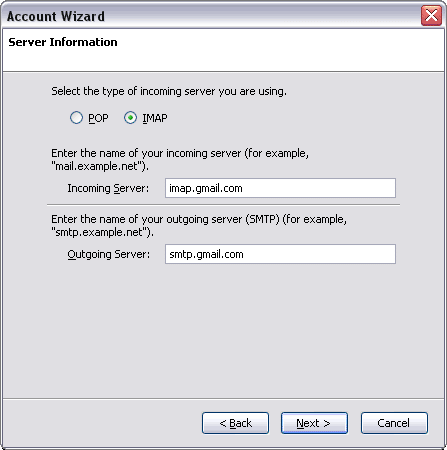
  5. Select IMAP as the type of incoming server you are using. Enter imap.gmail.com in the Incoming Server field.
  6. Set the Outgoing Server to smtp.gmail.com and click Next.
  7. Enter your full email address (including @gmail.com @your_domain.com) in the Incoming User Name and Outgoing User Name fields, and click Next.
  8. Enter a name for your email account in the Account Name field, and click Next.
  9. Verify your account information in the dialog box, and click Finish.
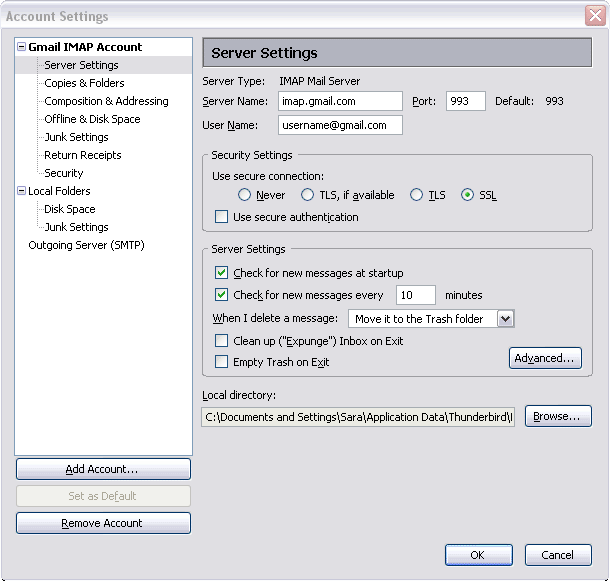
  10. Select Server Settings from the folder list below your new account.
  11. Update the Port value to 993.
  12. In the Security Settings section, select SSL from the Use secure connection options.
  13. Select the 'Check for messages at startup' checkbox and the 'Check for new messages every 10 minutes' checkbox.
  14. Click Outgoing Server (SMTP) in the folder list.
  15. Select the smtp.gmail.com (Default) entry from the list and click Edit. The SMTP Server page appears.
  16. Enter smtp.gmail.com as the Server Name and set the Port to 587.
  17. Select User name and password and enter your full email address (including @gmail.com or@your_domain.com) in the User Name field.
  18. Select TLS from the Use secure connection radio buttons and click OK.
  19. Click OK to save your changes and exit the Account Settings dialog.
  20. Check our recommended client settings, and adjust your client's settings as neede

Visual Explorer

Very good browser with lots of new and Good Features

To download Visual Explorer Click here


Features

Working with tabs

You can have multiple web pages open at the same time, all visible as tabs on the Tab Bar.You can view multiple web pages at the same time either as floating windows, tile or cascade.Recover closed tabs simply by clicking the URL Trash Can button located on the right of the Tab Bar.


 Default Tab View                     Window view (using Tile Vertically option)
               
Tab Browser

You can quickly view all of the web pages currently open in the form of thumbnail images using Tab Browser. This makes it fast and easy to locate a chosen web page without having to click on every tab.

The Navigate Bar

The Navigate Bar provides the main navigation controls used to browse web pages. This toolbar can be docked at the top or bottom of the screen or freely positioned as a floating toolbar.

navigation bar

You can use the Rewind and Fast Forward buttons to instantly jump to the first or last opened tabs or use their associated drop-down list of sites.
Additional features found on the Navigate Bar include the Address Bar and Search Bar.


The Address Bar

The address bar, also known as the location bar, is where web site addresses (URLs) are typed and displayed. It is located centrally on the Navigate Bar.
Visual Explorer's address bar works intuitively with Internet Explorer's address bar - adding a new URL to Internet Explorer will also be shown in Visual Explorer the next time it is run.
With the address bar you can:

Add or remove favorites with one-click
View the privacy and security status of websites you visit
Receive warnings of suspected phishing websites
Find website's you've visited without the need to type web addresses
address bar
The address bar provides a security status indictor for web pages, with a yellow certification pane indicating a secure web page, as shown below.
address bar
Hover over the certification pane to display a summary of the security certificate information for this web site.
address bar
Click the certification pane to view the full certificate.
Suspected phishing websites are indicated with a red pane and labeled Phishing Website, as shown below. For further details relating to the phishing protection features in Visual Explorer, see Safety Filter.
address bar
The address list view, or drop-down list, provides an intuitive interface when looking for recently typed web site addresses (URLs).
As soon as you start typing anything in the address bar, the drop-down will appear with likely matches - you don't have to complete the full URL of a page you've visited before, Visual Explorer can do that for you. It performs checks across all visited web page addresses and the titles of those web pages. This helps you work faster and is particularly helpful for locating those web pages which you remember visiting but cannot recall the address.
In the example below, simply typing oly when searching for Olympic related websites, we can see a range of sites visited that match this query and whether or not they have been added to your favorites list. The characters you type are automatically and dynamically highlighted in bold in the list. Click on any entry in the list to visit the associated web page.
address bar
Visual Explorer's address bar works intuitively with Internet Explorer's address bar - adding a new URL to Internet Explorer will also be shown in Visual Explorer the next time it is run.


The Explorer Bar provides instant access to a wealth of features including Favorites, History, an advanced RSS Reader and the full range of BlueGTM search engines (powered by Google).
The following tabbed items are accessible via the Explorer Bar:

Favorites
History
Search
RSS
Source
Folders
Notepad
The Favorites items you see in Visual Explorer are shared with Internet Explorer. This means any changes you make to your favorites in one browser will be instantly replicated in the other.
You can find websites you have visited by date using the History Tab.
BlueGTM is an innovative search engine based entirely on Google results. You can use it to search the web just like Google. You can also search popular categories for music, entertainment, games, sport, fashion, news and more. The Search tab lets you perform instant BlueGTM searches with the option to do this across multiple search categories.
BlueG
You can view and manage RSS feeds using Visual Explorer's advanced RSS reader. RSS feeds, also known as feeds or web feeds are frequently updated content published by a website. Feeds are usually used for news and blog websites, but can also be used for distributing other types of digital content, including pictures, audio or video. Feeds can also be used to deliver audio content (usually in MP3 format) which you can listen to on your computer or MP3 player - referred to as podcasting.
RSS
You can instantly view the source code for web pages in the Source tab. Text that appears in written form on the web page is highlighted in bold for ease of reference. You can copy and paste text from the Source tab into other applications.

View the contents of your local and network drives using the Folders tab. The Folders tab saves time if you need to review your local and network files and folders, avoiding the need to launch a separate file management application such as Windows Explorer.

You can copy and paste text you find on any web page into the Notepad tab for future reference. The act of pasting text into the Notepad tab removes any formatting associated with the text, which can be helpful if you intend copying and pasting that text into another application